Table Management: Live RSVP Table Plan
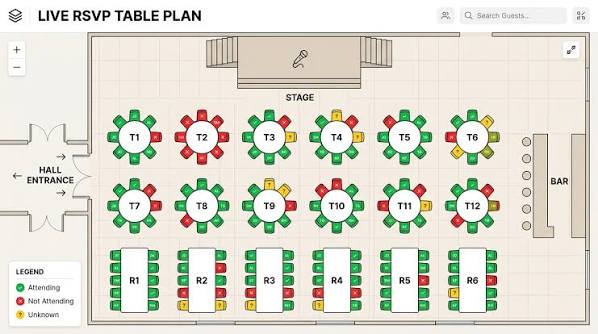
This interface presents a 2D top-down floor plan of the event venue. Users can easily track guest seating and attendance status visually in real-time.
Key Features and Color Coding:
- Green (Attending): Represents guests who have confirmed their attendance. A small checkmark (✓) and the guest's initials are visible on these seats.
- Red (Not Attending): Indicates guests who have stated they cannot attend the event. The seats are colored red and have a cross mark (✗) on them.
- Yellow (Unknown): Indicates guests who have not yet responded or whose attendance is unconfirmed. The seats are colored yellow and marked with a question mark (?).
Interface Details:
The design is simple and intuitive. The shape of the tables (round or rectangular) can be adapted to the real architecture of the venue. The table borders are segmented and colored according to the RSVP status of the surrounding guests.
To facilitate spatial orientation, key physical elements such as the Hall Entrance, Stage, and Bar are also reflected in the plan. The Legend located in the bottom left corner helps the manager read the panel more quickly.